Posts

Showing posts with the label Blogger

Qualities of a Successful Blogger – A Guide for New Bloggers

Image
A new blogger must strike hard to become successful. He must know the secrets of all possible problems and also solution to face the problems. You are entering in a zone where your work is challenge by hundreds and thousands of other bloggers. To gain ground and be a successful blogger, keep the following points in your mind: Be Patient A new blogger must be patient and he must be steady against every problems. What kills a blogger passion is disappointment. You should think these problems are just temporary. Fight against them. Remember that,                 There is no shortcut for big achievements.  If you face a problem, you must find solution for that. If you cannot find solution for that, ask someone else. There are many forums and blogs that would provide you free help. So do not say “No” to blogging. Keep facing the hurdles. You will surely rise after some time. Be ori...

Main factors of On-Page SEO 2014 – Useful Guidelines for Bloggers Today

Image
SEO has been a major factor of Search Engine. Finding good and bad content is the basic concept of SEO. The major problems which a blogger faces are variations in SEO techniques. There have been seen many techniques which are changed now and thus it really matters for the bloggers/webmasters. Let me explain the effects of SEO variations and search engine result page. I remember when image search was changed and many bloggers and websites’ owners had lost their traffic. SERP brought a huge change and thus many people lost their traffic. However, it does not have anything with SEO. Similarly, when a rule is changed in SEO, it really brings a huge change. For instance, if a rule for the post title is changed, it could cause a huge difference. You must know which thing is to be learnt time after time. Following are some tips for the latest SEO techniques: Keyword Density: Keyword density has been changing time after time. I remember when it was from 5% to 7%. B...

Writing Successful Articles for Web Blogs – SEO friendly Articles

Image
Before writing an article you must keep some points which are being discussed in the following paragraphs. Your article really matters and it expresses you to your readers. You must not ignore these points else you could lose your article’s importance. Ideas in your Articles The first and foremost thing which you should keep in your mind is an idea which you are going to share with your readers. You must have some good tips regarding a specific topic so you could express that. If you have no idea behind your articles and your audience cannot get an idea from your article then you are simply annoying your readers. Bring an idea in your words. Think well before expressing your mind and try to have the best of ideas. What I mean of idea? Yes. I must explain it. Suppose you are writing about health problems and you have observed that a traditional methodology is being applied to heal a disease. Thus you can bring a new idea – a new method – to find the solution of such disea...

Tips and Qualities of a Successful Blogger Post

Image
Before posting any more, you must analyse the most successful posts on your blog . What do you observe in these posts? What made you stand in these posts? What are the drawbacks of these posts? And finally see why other posts are unsuccessful on your Blog? To improve your posting quality, you must understand the tips which I am going to share with you today. These instructions could help you to be successful in future. Your Site’s Niche This is an important point to accept today. Your posts must be according to the topic for which you have initiated your site. If you have a site about Football and you are posting about Blogging Tips , then you are wasting your time. You many attract some traffic from many sources but Search Engine will not bless you with a mammoth traffic. So this is important to declare you niche and start working according to your topic. However, there are many successful sites which are serving multiple topics. The fact is that such sites are managed b...

Learn how to Add Widgets on Blogger

Image
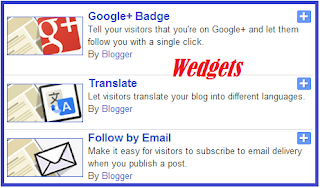
Blogger new interface and new widgets (Also called Gadgets) have lot of things to be known. These changing really help you to boost up your site. Enabling Search Description in Blogger for every post and using custom permalink are great things for SEO lovers. Similarly widgets have also reasonable contribution in site popularity and providing good navigation on your site. By default, there are hardly a few widgets added on your site. Adding Widget / Gadget on Your Site Follow the instructions below: Log in to your Blogger Dashboard Go to Layout of your blog. See the following Screenshot now: By clicking on Layout, you will be able to add a widget. When you click on “Widget” as shown in above screenshot, the following Box appears. Choose the widget that you need. For instance, we are going to choose G+ like box. By clicking on this Widget, the following Box appears. Make setting as you want and save the changes. You are done now. Till then...

How to Optimize Images in Blog Post

Image
Adding optimized images into blog posts is not only one of good SEO tips  but it also adds into the good-look of post. Therefore, using images in post should be maintained. Do not post without an image. Images can convey a good message. It is a popular say that a single image can represent meanings of hundred of words. Therefore, using images in post are extremely important. Google Image Search is also a good example to realize the importance of images in posts. But without optimizations, these images cannot bring traffic to your site. So treat images as a factor of SEO.

How to Change Headings in Blogger

Image
It is important to know that how to change headings in Blogger i.e. h1, h2 and h3. Optimization of headings will improve your traffic. By default they are not friendly.  Like other SEO elements , headings also play a massive role. The use of proper headings could help you to attract a great traffic from search engines. These headings are from <h1> to <h6> in descending order but this must be noted that <h1> to <h3> are considered important headings to maintain good optimization of your site.

SEO Tips to Customize Blogger Permalink

Image
Permalink is one of the most important elements according to SEO rules . When there was no custom permalink in Blogger, it was something difficult to have managed SEO rules. However, after the addition of permalink, SEO experts have appreciated Blogger for its approach. You can see how permalink is shown in search result in the following screenshot. Importance of Permalink Permalink is your custom link which is

How to Enable Search Description in Blogger Post

Image
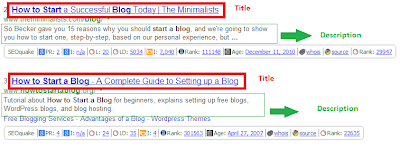
Search Description in blogger post is one of the most important elements. Therefore, it is important to handle search description carefully while posting on your blog. You can understand the logic of search engine from the given screenshot. Importance of Search Description The very first element is Post title, second domain name, third URL and the fourth one is search description which appears in search result.

6 Necessary Tips for Best Blog Post Title – The King

Image
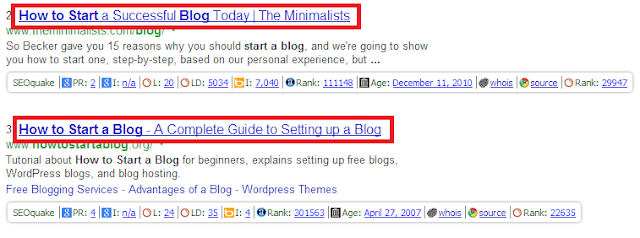
Like other elements of any post, post title is also very important. In fact, it is the most important element. Post title plays a great role in bringing traffic from search engine and other places. See how Google Search Engine displays title in Google Search. When your any post is displayed in search engine results, then it depends on the title to attract traffic. How unlucky it is when your post is shown in search engine and it does not get clicked.

Managing Your Personal Blogger Dashboard

Image
I remember the old interface of Blogger Dashboard . That was easy and friendly but the new interface must be said an easier and more friendly than that old interface. With time, Blogger has changed its dashboard and some new and very important options have been included. From the given screenshot, I will tell you how you would manage your blogger dashboard and what could you do using several options from here. Some new options really make us able to work easily according to SEO basic rules .

Start Blogging With Free Blogger Templates - SEO Friendly Templates

Image
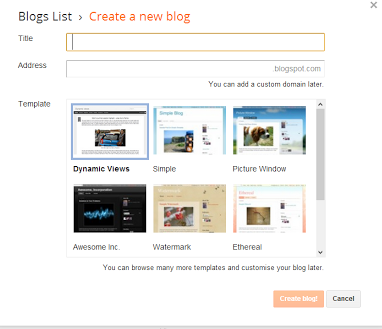
When you have decided to start work on a blog and you have chosen a very good niche topic which is searched a lot, then you must decide which platform to choose. There are two famous platforms on the web. 1. Blogger.com 2. WordPress.com You may choose any one of them. Blogger has been famous for the last few years as it is being administrated by Google which is the best search engine and it also owns AdSense program. For these reasons, I recommend you to work with blogger.

Free Best Blogger Templates Download – Create Blogger Blogspot Template

Image
As we know that the looking – template- of a site really matters. There for you are suggested to select an SEO Friendly Blogger Template . Before selecting a template, you must know that a loaded template is not considered a friendly template. It must be faster as well as good-looking. The layout of your blog must be user friendly. We know that Google really appreciates those web materials which are user’s friendly. Try to have an easy to navigate and easy to find content on your site for your users which they are looking for.

Discover how Blogger and SEO have Links - Video Help Available

Image
SEO (Search Engine Optimization) is very important for web related business. No SEO, No Successful business. It is very important to build an SEO friendly website/blog before launching any project on them. Because SEO strengthens your web pages and thus search engine can find them easily. Before I discus SEO in depth, I would like to display the index which I am going to help you with in coming days. My first work will be on blogger. Blogger is like a diary that gives you some free hosting to work. Important Points About Blogger To Know before Blogging Before starting work on blogger, you must have to get registered on G-mail. after that simply go to blogger.com and fill up some basic information. Follow the instructions which are being given. Now you have to learn the following tutorials for successful bogging. Choose a good looking and SEO Friendly Blogger Template Choose a niche Topic which you know very well about How to manage Blogger Dishboard Create SEO Frien...

Do you know how Blogger manages to earn money via internet without investment

Image
As we know that it is not the blogger which pays us. It is Google Adsenes. But we use Blogger for free hosting as a blog service which is also by Google. Being the service of the giant search engine of the world, it has gained great trust from users.